


The Keyboard Shortcuts for Faster Navigation | Jpress

What Are Keyboard Shortcuts?
Keyboard shortcuts are key combinations that help you perform actions quickly without relying on a mouse. They enhance productivity by allowing you to execute commands instantly within applications or operating systems.

Essential Keyboard Shortcuts You Should Know
Here are some must-know shortcuts to streamline your workflow:
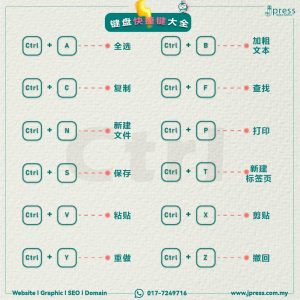
- Ctrl + A – Select all text or files
- Ctrl + B – Bold the selected text
- Ctrl + C – Copy selected text or items
- Ctrl + F – Find specific words in a document
- Ctrl + N – Create New Document
- Ctrl + P – Print the page
- Ctrl + S – Save the current content
- Ctrl + T – Create New Page
- Ctrl + V – Paste copied content
- Ctrl + X – Cut selected text or items
- Ctrl + Y – Redo the last action
- Ctrl + Z – Undo the last action
- Alt + Tab – Switch between open applications
- Alt + F4 – Close the Application
- Windows + L – Lock your computer
- Windows + V – Open clipboard history
- Windows + (;/.) – Open emoji keyboard
- F2 – Rename selected file or folder
- F5 – Refresh the active window
Windows Keyboard Shortcuts
If you’re using a Windows, these shortcuts will help you navigate the system more efficiently:
- Windows + Shift + S – Take a screenshot of a selected area (Windows 10 & 11)
- Windows + D – Show or hide the desktop
- Windows + E – Open File Explorer
- Windows + I – Quickly open system settings
- Windows + P – Manage display settings and projection options
- Windows + X – Open the power user menu for quick system access
- Windows + ; – Open the emoji panel for easy emoji selection
- Windows + Pause/Break – Open system properties
Window Management Shortcuts
- Windows + ↑ – Maximize the current window
- Windows + ↓ – Minimize the window or restore it
- Windows + ← / → – Snap windows to the left or right side
Virtual Desktop Shortcuts (Windows 10 & 11)
Virtual desktops help you separate tasks and stay organized:
- Windows + Tab – View all open apps and create new virtual desktops
- Windows + Ctrl + D – Create a new virtual desktop
- Windows + Ctrl + ← / → – Switch between virtual desktops
Mastering these keyboard shortcuts will save you time, boost your productivity, and make navigating your Windows PC effortless. Try them out and see the difference!
Read More Articles
- Mastering Browser Hotkeys for Efficient Web Navigation | Jpress Knowledge
- 3 Popular Online Video Converters | Jpress Knowledge
- AI in Excel: Boost Productivity & Automate Spreadsheet Tasks
Looking to elevate your online presence?
Jpress offers comprehensive services to help your business thrive in the digital world. From cutting-edge website design and development to ongoing website maintenance, we ensure your site is always in top shape. Our expert SEO services can boost your search engine rankings, while our Facebook ads marketing strategies will drive targeted traffic to your site.
Need a standout brand identity? We provide professional logo design and graphic design to make your business memorable. Explore our full range of services and see how we can support your growth. Check out Jpress Services. For personalized support, feel free to reach out to us on WhatsApp or follow us on social media.
Learn more about our website design services | Discover our SEO solutions | Explore our marketing strategies



The Keyboard Shortcuts for Faster Navigation | Jpress
What Are Keyboard Shortcuts?
Keyboard shortcuts are key combinations that help you perform actions quickly without relying on a mouse. They enhance productivity by allowing you to execute commands instantly within applications or operating systems.
Essential Keyboard Shortcuts You Should Know
Here are some must-know shortcuts to streamline your workflow:
- Ctrl + A – Select all text or files
- Ctrl + B – Bold the selected text
- Ctrl + C – Copy selected text or items
- Ctrl + F – Find specific words in a document
- Ctrl + N – Create New Document
- Ctrl + P – Print the page
- Ctrl + S – Save the current content
- Ctrl + T – Create New Page
- Ctrl + V – Paste copied content
- Ctrl + X – Cut selected text or items
- Ctrl + Y – Redo the last action
- Ctrl + Z – Undo the last action
- Alt + Tab – Switch between open applications
- Alt + F4 – Close the Application
- Windows + L – Lock your computer
- Windows + V – Open clipboard history
- Windows + (;/.) – Open emoji keyboard
- F2 – Rename selected file or folder
- F5 – Refresh the active window
Windows Keyboard Shortcuts
If you’re using a Windows, these shortcuts will help you navigate the system more efficiently:
- Windows + Shift + S – Take a screenshot of a selected area (Windows 10 & 11)
- Windows + D – Show or hide the desktop
- Windows + E – Open File Explorer
- Windows + I – Quickly open system settings
- Windows + P – Manage display settings and projection options
- Windows + X – Open the power user menu for quick system access
- Windows + ; – Open the emoji panel for easy emoji selection
- Windows + Pause/Break – Open system properties
Window Management Shortcuts
- Windows + ↑ – Maximize the current window
- Windows + ↓ – Minimize the window or restore it
- Windows + ← / → – Snap windows to the left or right side
Virtual Desktop Shortcuts (Windows 10 & 11)
Virtual desktops help you separate tasks and stay organized:
- Windows + Tab – View all open apps and create new virtual desktops
- Windows + Ctrl + D – Create a new virtual desktop
- Windows + Ctrl + ← / → – Switch between virtual desktops
Mastering these keyboard shortcuts will save you time, boost your productivity, and make navigating your Windows PC effortless. Try them out and see the difference!
Read More Articles
- Mastering Browser Hotkeys for Efficient Web Navigation | Jpress Knowledge
- 3 Popular Online Video Converters | Jpress Knowledge
- AI in Excel: Boost Productivity & Automate Spreadsheet Tasks
Looking to elevate your online presence?
Jpress offers comprehensive services to help your business thrive in the digital world. From cutting-edge website design and development to ongoing website maintenance, we ensure your site is always in top shape. Our expert SEO services can boost your search engine rankings, while our Facebook ads marketing strategies will drive targeted traffic to your site.
Need a standout brand identity? We provide professional logo design and graphic design to make your business memorable. Explore our full range of services and see how we can support your growth. Check out Jpress Services. For personalized support, feel free to reach out to us on WhatsApp or follow us on social media.
Learn more about our website design services | Discover our SEO solutions | Explore our marketing strategies


