


Image Clarity Tips | What is a Pixel? | Jpress Image Optimization Tips
In today’s visual world, image quality is more important than ever. Whether you’re designing a website, printing a brochure, or posting on social media, clear, sharp images make all the difference. But what exactly makes an image “ clear”? It all starts with pixels, the tiny components of a digital image. Understanding what a pixel is and how resolution works can help you determine if an image is sharp enough for your needs. In this post, we’ll cover the basics of pixels, explain how to check image resolution, and share some simple tips to ensure your visuals are always clear and professional.
Read More Articles:
- Free AI Photo Enhancers: Easily Make Your Photo Clearer
- Smart Image Optimization Tips for Faster Website Performance
- Avoid Blurry Images on Social Media: UX & Brand Tips
What Is a Pixel?
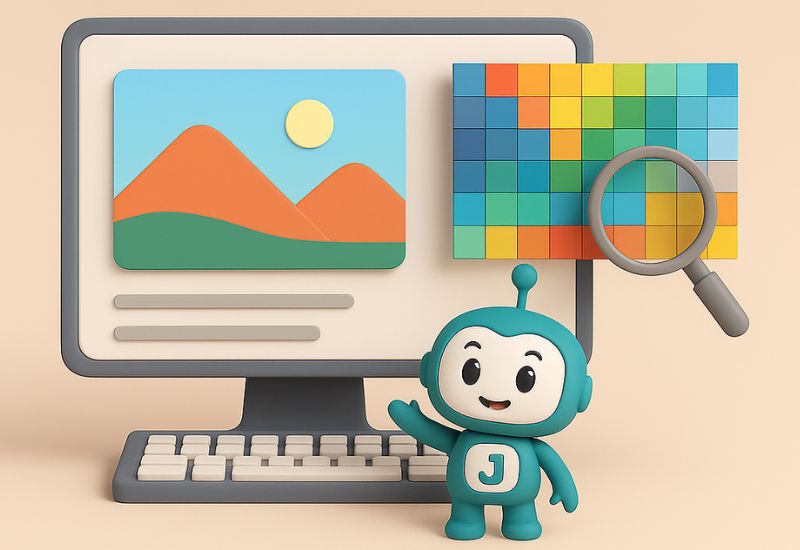
A pixel, short for “picture element,” is the smallest unit in a digital image. Think of it as a tiny dot of color. When you put millions of these dots together in a grid, they create the images you see on your screens or in print. Each pixel contains specific color information, typically made from combinations of red, green, and blue (RGB) values.
The more pixels you have in an image, the more detail it can display. This is where the concept of resolution comes into play.
Understanding Image Resolution
Image Resolution refers to the level of details an image holds and is mesured in 2 key ways:
- Pixel dimensions:
This is the actual size of an image in terms of width and height (e.g., 1920 x 1080 pixels). It tells you how many pixels the image contains horizontally and vertically. - PPI (Pixels Per Inch):
This measures how densely the pixels are packed into each inch of the image, especially important for printing. A higher PPI usually means a sharper image when printed.
In simple terms, the more pixels packed into a given space, the sharper and more detailed the image appears.
How Can I Tell If The Image Is Clear?
Now that you understand what a pixel is and how resolution works, how do you actually judge whether an image is clear enough? Here are a few practical steps:
1. Check the Image Dimensions
Most operating systems allow you to view this easily:
- On Windows: Right-click the image > Properties > Details tab.
- On macOS: Right-click the image > Get Info.
You’ll see numbers like “3000 x 2000” — that’s the pixel width and height. The higher these numbers, the more data the image contains, and the sharper it can appear—especially when scaled.
2. Calculate the PPI (For Print)
To determine if an image will print sharply, you need to consider its size in inches and its pixel dimensions. Use this simple formula:
PPI = Pixel Dimension ÷ Print Size in Inches
For example, if an image is 3000 pixels wide and you want to print it at 10 inches wide:
3000 ÷ 10 = 300 PPI
A PPI of 300 is considered professional quality for print. Anything lower may start to look pixelated when printed, especially for high-detail applications like photos or marketing materials.
3. Consider the Viewing Distance
Not all images need to be ultra-sharp. For example, billboards are viewed from far away, so they can have a lower PPI and still look fine. On the other hand, images for a website or brochure that people view up close should have a higher PPI to maintain clarity.
Conclusion
Understanding what is a pixel and how resolution affects image clarity is essential for working with digital design, social media content, or preparing documents for print. By checking the dimensions and calculating the PPI, you can ensure that your images look sharp and professional in every situation.
Looking to elevate your online presence?
Jpress offers comprehensive services to help your business thrive in the digital world. From cutting-edge website design and development to ongoing website maintenance, we ensure your site is always in top shape. Our expert SEO services can boost your search engine rankings, while our Facebook ads marketing strategies will drive targeted traffic to your site.
Need a standout brand identity? We provide professional logo design and graphic design to make your business memorable. Explore our full range of services and see how we can support your growth. Check out Jpress Services. For personalized support, feel free to reach out to us on WhatsApp or follow us on social media.
Learn more about our website design services | Discover our SEO solutions | Explore our marketing strategies



Image Clarity Tips | What is a Pixel? | Jpress Image Optimization Tips
In today’s visual world, image quality is more important than ever. Whether you’re designing a website, printing a brochure, or posting on social media, clear, sharp images make all the difference. But what exactly makes an image “ clear”? It all starts with pixels, the tiny components of a digital image. Understanding what a pixel is and how resolution works can help you determine if an image is sharp enough for your needs. In this post, we’ll cover the basics of pixels, explain how to check image resolution, and share some simple tips to ensure your visuals are always clear and professional.
Read More Articles:
- Free AI Photo Enhancers: Easily Make Your Photo Clearer
- Smart Image Optimization Tips for Faster Website Performance
- Avoid Blurry Images on Social Media: UX & Brand Tips
What Is a Pixel?
A pixel, short for “picture element,” is the smallest unit in a digital image. Think of it as a tiny dot of color. When you put millions of these dots together in a grid, they create the images you see on your screens or in print. Each pixel contains specific color information, typically made from combinations of red, green, and blue (RGB) values.
The more pixels you have in an image, the more detail it can display. This is where the concept of resolution comes into play.
Understanding Image Resolution
Image Resolution refers to the level of details an image holds and is mesured in 2 key ways:
- Pixel dimensions:
This is the actual size of an image in terms of width and height (e.g., 1920 x 1080 pixels). It tells you how many pixels the image contains horizontally and vertically. - PPI (Pixels Per Inch):
This measures how densely the pixels are packed into each inch of the image, especially important for printing. A higher PPI usually means a sharper image when printed.
In simple terms, the more pixels packed into a given space, the sharper and more detailed the image appears.
How Can I Tell If The Image Is Clear?
Now that you understand what a pixel is and how resolution works, how do you actually judge whether an image is clear enough? Here are a few practical steps:
1. Check the Image Dimensions
Most operating systems allow you to view this easily:
- On Windows: Right-click the image > Properties > Details tab.
- On macOS: Right-click the image > Get Info.
You’ll see numbers like “3000 x 2000” — that’s the pixel width and height. The higher these numbers, the more data the image contains, and the sharper it can appear—especially when scaled.
2. Calculate the PPI (For Print)
To determine if an image will print sharply, you need to consider its size in inches and its pixel dimensions. Use this simple formula:
PPI = Pixel Dimension ÷ Print Size in Inches
For example, if an image is 3000 pixels wide and you want to print it at 10 inches wide:
3000 ÷ 10 = 300 PPI
A PPI of 300 is considered professional quality for print. Anything lower may start to look pixelated when printed, especially for high-detail applications like photos or marketing materials.
3. Consider the Viewing Distance
Not all images need to be ultra-sharp. For example, billboards are viewed from far away, so they can have a lower PPI and still look fine. On the other hand, images for a website or brochure that people view up close should have a higher PPI to maintain clarity.
Conclusion
Understanding what is a pixel and how resolution affects image clarity is essential for working with digital design, social media content, or preparing documents for print. By checking the dimensions and calculating the PPI, you can ensure that your images look sharp and professional in every situation.
Looking to elevate your online presence?
Jpress offers comprehensive services to help your business thrive in the digital world. From cutting-edge website design and development to ongoing website maintenance, we ensure your site is always in top shape. Our expert SEO services can boost your search engine rankings, while our Facebook ads marketing strategies will drive targeted traffic to your site.
Need a standout brand identity? We provide professional logo design and graphic design to make your business memorable. Explore our full range of services and see how we can support your growth. Check out Jpress Services. For personalized support, feel free to reach out to us on WhatsApp or follow us on social media.
Learn more about our website design services | Discover our SEO solutions | Explore our marketing strategies


